This article describes a cost-effective feature-rich infrastructure. The hypothetical setup described below costs $37.50 per month + $35 per year (excluding domain costs).
Requirements
- VPS with full root access
- Basic server management UI (e.g. create sites and databases)
- Automatic security updates
- SSL
- Automatic on-site & off-site backups
- A basic level of redundancy
- Reasonable cost ($50 or less per month)
Solution
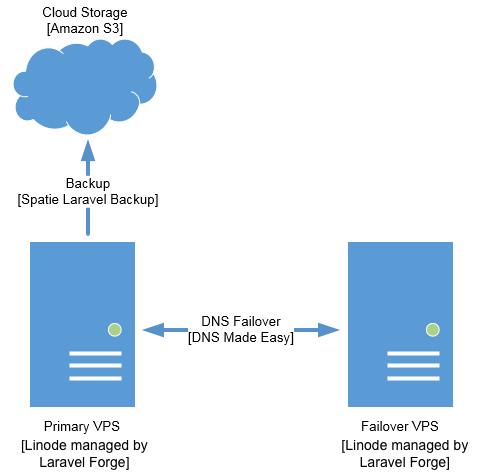
Hypothetical providers in [brackets] with detailed provider options below.
Cost
For the hypothetical providers described above. Similar cost for alternate providers.
- Primary VPS with on-site backup enabled: $12.50 / month
- Failover VPS: $5 / month
- Server management: $19 / month
- VPS backup: $0 / month
- Off-site backup storage: $1 / month (estimate)
- DNS hosting & fail-over: $35 / year
VPS (Virtual Private Server)
This component is pretty straightforward and there are a few well known low-cost VPS “cloud” providers. I personally use Linode but have also tried DigitalOcean and Vultr and don’t think you can go wrong with any of these hosts.
You will need two VPS instances: a primary and a failover. For the primary VPS, you will have to assess your hardware needs on a case by case basis. The $10 / month offering at the hosts mentioned above is a good starting point but this obviously depends on many variables such as the applications and content that you are serving. Adding capacity is easy, inexpensive, and requires minimal to no downtime so my advice is to start with a less expensive plan and scale as needed. You can use tools like Apache Bench (free) or Loader.io (freemium) to test how your server behaves under load.
For the failover VPS, the $5 / month plans should be sufficient for a secondary instance that will hopefully never be used. This approach assumes that your failover simply displays a message that your site is currently unavailable (the “fail whale” approach).

Your primary and failover instances should be in different data centers and you should even consider using different hosts.
Server Management
Some level of web-based server management for routine tasks like security patches, and creating sites and databases may be preferable over having to use the command line. For initial server configuration and ongoing maintenance I am using Laravel Forge which provides all of this functionality (and a lot more) through a clean web-based interface. They also provision LetsEncrypt (free) SSL certificates with the click of a button and automatically renew them. Even though Laravel Forge configures your VPS initially and provides a simple control panel for common tasks, you are still able to access your server as root for your own customizations. Laravel Forge is meant for PHP hosting so it’s not ideal if you are a heavy user of another server-side programming language. The cost of Laravel Forge is $19 per month which allows you to manage unlimited servers.
I also considered the following providers to help with server management but ultimately went with Laravel Forge.
- ServerPilot: I am a heavy user of Laravel so Forge makes the most sense for me given how nicely it pairs with the framework. If you are a user of other PHP Frameworks then a more generic tool like ServerPilot may work better for you.
- RunCloud: This product seems to offer a good mix of features between Laravel Forge and ServerPilot and is well priced but lesser known than Laravel Forge and ServerPilot.
- Cloudways: This product does not allow for root access to your server which was an immediate deal breaker for me.
DNS Hosting and Failover
You can host your DNS for free using your hosting provider, domain registrar, or CloudFlare but there are advantages to using a company that specializes in DNS hosting including quicker resolution speeds and features like DNS failover. DNS failover is an inexpensive way to get some basic redundancy. It works by monitoring your primary server and automatically repointing your DNS to a secondary (failover) server in the event your primary server is unreachable. This switch is made almost immediately so there is little to no downtime for end users.
A good option for DNS hosting and failover is DNS Made Easy which offers a good balance between price and features. Some other alternatives include Amazon Route 53 and DynDNS.
Backup
Backup is a critical part of any infrastructure that warrants its own discussion but I’ll touch upon it briefly in this article. All of the VPS providers mentioned above offer some level of backup for a nominal charge. This is a good first layer of protection but should not be all you rely on for backups. These providers store your backups in the same data center where your VPS is located so if the data center is unavailable (think DDoS attack) your backups will also be unavailable. Additionally, hosting provider backups do not typically allow for granular control over backup frequency and rotation.
A great tool which pairs well with the backup solutions offered by hosting providers is an open source package from the folks at Spatie.be called Laravel Backup. Despite the name, you can actually backup non-Laravel apps and an entire VPS including databases with this package and push the backups to any filesystem supported by Laravel. You will need to be familiar with Laravel to setup and configure the package but once you do it can backup files, directories, and databases on your VPS.
If you are not familiar with Laravel or comfortable installing / configuring this package, a good alternative is Ottomatik but it does come at a cost.
Summary
I encourage everyone to explore what’s out there before settling for higher cost and less feature-rich options like shared / managed hosting.